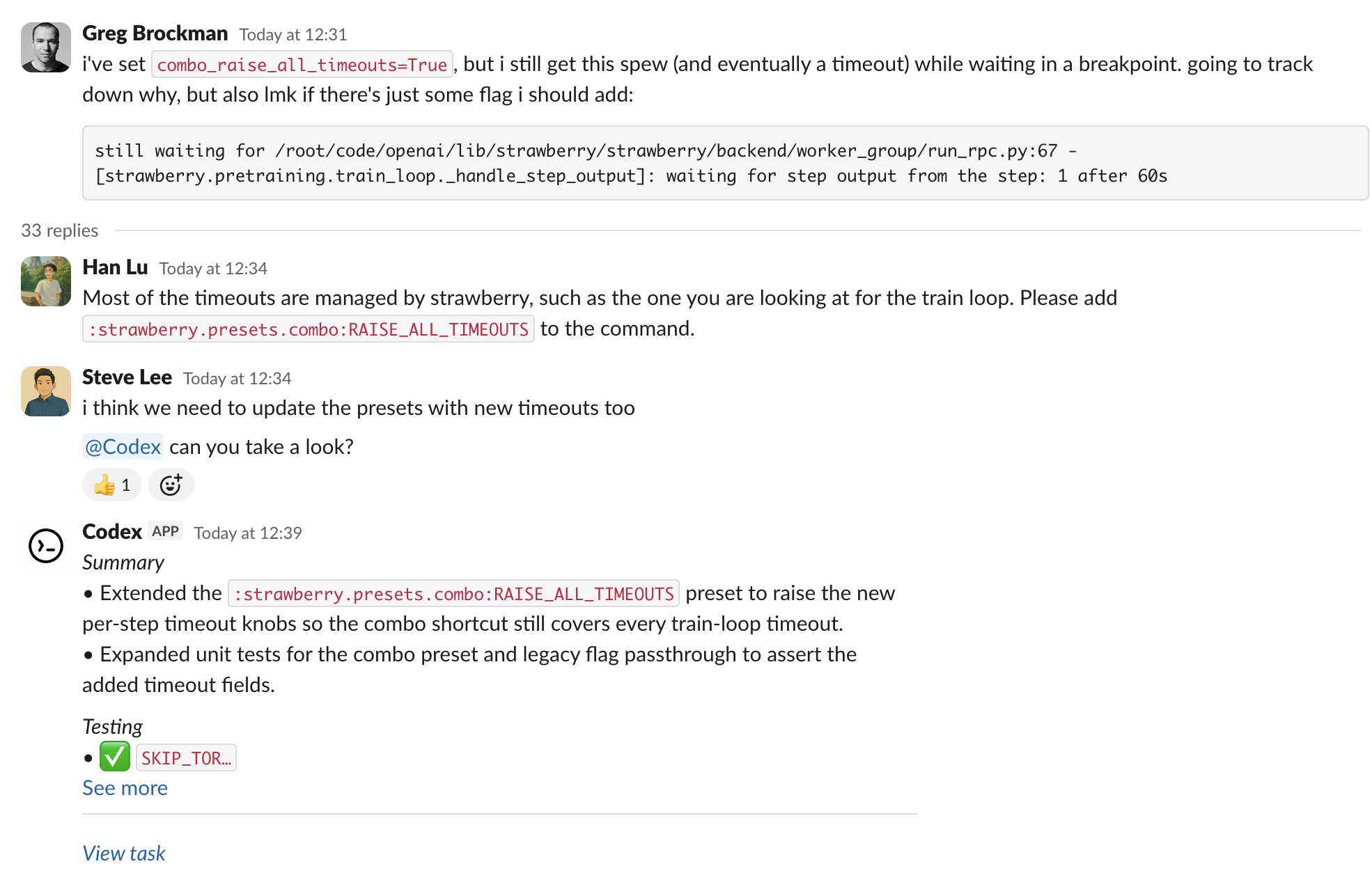
在 Slack 中使用 Codex,可以从 channels 和 threads 启动 coding tasks。使用 prompt mention @Codex 后,Codex 会创建一个 cloud task,并回复结果。
设置 Codex cloud tasks。你需要 Plus、Pro、Business、Enterprise 或 Edu plan(参见 ChatGPT pricing)、已连接的 GitHub account,以及至少一个 environment。
前往 Codex settings,为你的 workspace 安装 Slack app。根据你的 Slack workspace policies,安装可能需要 admin approval。
把 @Codex 添加到 channel。如果还没有添加,当你 mention 它时,Slack 会提示你添加。
启动 task
在 channel 或 thread 中 mention @Codex 并写入你的 prompt。Codex 可以参考 thread 中更早的 messages,所以通常不需要重复上下文。
可选:在 prompt 中指定 environment 或 repository,例如:@Codex fix the above in openai/codex。
等待 Codex 做出反应(眼睛标记)并回复 task link。任务完成后,Codex 会发布结果,并根据你的 settings 在 thread 中发布 answer。
Codex 如何选择 environment 和 repo
Codex 会检查你有权访问的 environments,并选择最匹配请求的一个。如果请求有歧义,它会回退到你最近使用的 environment。
task 会在该 environment repo map 中列出的第一个 repository 的 default branch 上运行。如果需要不同默认值或更多 repositories,请在 Codex 中更新 repo map。
如果没有可用的合适 environment 或 repository,Codex 会在 Slack 中回复修复该问题的说明,然后你可以重试。
Enterprise data controls
默认情况下,Codex 会在 thread 中回复 answer,其中可能包含它运行所在 environment 的信息。要阻止这一点,Enterprise admin 可以在 ChatGPT workspace settings 中清除 Allow Codex Slack app to post answers on task completion。admin 关闭 answers 后,Codex 只会回复 task link。
Data usage, privacy, and security
当你 mention @Codex 时,Codex 会接收你的 message 和 thread history,以理解请求并创建 task。数据处理遵循 OpenAI Privacy Policy、Terms of Use 和其他适用 policies。关于 security 的更多信息,请参阅 Codex security documentation。
Codex 使用 large language models,可能会出错。请始终 review answers 和 diffs。
Tips and troubleshooting
Missing connections:如果 Codex 无法确认你的 Slack 或 GitHub connection,它会回复一个用于 reconnect 的 link。
Unexpected environment choice:在 thread 中回复你想使用的 environment(例如 Please run this in openai/openai (applied)),然后再次 mention @Codex。
Long or complex threads:在最新 message 中总结关键细节,避免 Codex 漏掉埋在更早 thread 内容里的 context。
Workspace posting:某些 Enterprise workspaces 会限制发布 final answers。在这种情况下,请打开 task link 查看 progress 和 results。
更多帮助:参见 OpenAI Help Center。