Review pane 可以帮助你理解 Codex 改了什么、给出有针对性的 feedback,并决定要保留哪些变更。
它只适用于位于 Git repository 内的项目。如果你的项目还不是 Git repository,review pane 会提示你创建一个。
它会显示哪些变更
Review pane 反映的是你的 Git repository 状态,而不只是 Codex 编辑过的内容。这意味着它会显示:
Codex 做出的变更
你自己做出的变更
repo 中任何其他 uncommitted changes
默认情况下,review pane 会聚焦 uncommitted changes。你也可以把 scope 切换为:
All branch changes(相对于 base branch 的 diff)
Last turn changes(仅最近一次 assistant turn)
本地工作时,你还可以在 Unstaged 和 Staged changes 之间切换。
浏览 review pane
点击文件名通常会在你选择的 editor 中打开该文件。你可以在 settings 中选择默认 editor。
点击文件名背景会展开或折叠 diff。
按住 Cmd 点击单行,会在你选择的 editor 中打开该行。
如果你对某个变更满意,可以 stage the changes or revert changes 你不想保留的内容。
用 inline comments 提供反馈
Inline comments 让你可以把 feedback 直接附加到 diff 中的具体行。这通常是引导 Codex 做出正确修复的最快方式。
要留下 inline comment:
打开 review pane。
将鼠标悬停在你想评论的那一行上。
点击出现的 + 按钮。
写下你的 feedback 并提交。
完成 feedback 后,向 thread 发送一条消息。
因为 comments 是 line-specific,Codex 可以比接收一般性 instruction 时更精确地响应。
Codex 会把 inline comments 视为 review guidance。留下 comments 后,请发送一条 follow-up message 明确你的意图,例如:“Address the inline comments and keep the scope minimal.”
Code review 结果
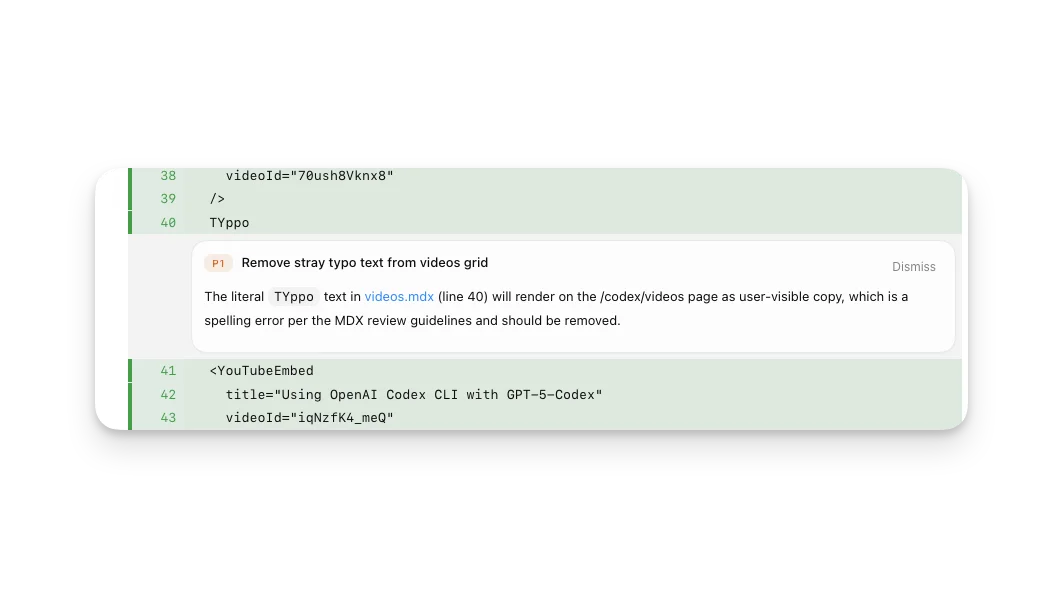
如果你使用 /review 运行 code review,comments 会直接以内联形式显示在 review pane 中。
Pull request reviews
当 Codex 可以访问你的 GitHub repository,且当前项目位于 pull request branch 上时,Codex app 可以帮助你不离开 app 就处理 pull request feedback。sidebar 会显示 pull request context 和 reviewers 的 feedback,review pane 会把 comments 和 diff 放在一起显示,这样你可以在同一个 thread 中要求 Codex 处理问题。
安装 GitHub CLI(gh),并用 gh auth login 完成认证,这样 Codex 才能加载 pull request context、review comments 和 changed files。如果缺少 gh 或未认证,pull request details 可能不会显示在 sidebar 或 review pane 中。
如果你想把完整 fix loop 留在一个地方,可以使用这个流程:
在 pull request branch 上打开 review pane。
查看 pull request context、comments 和 changed files。
要求 Codex 修复你想处理的具体 comments。
在 review pane 中检查生成的 diff。
准备好后,stage、commit,并把 changes push 到 PR branch。
对于 GitHub-triggered reviews,请参阅 Use Codex in GitHub。
Stage 和 revert files
Review pane 包含 Git actions,让你可以在 commit 前调整 diff 的形状。
你可以在以下层级 stage、unstage 或 revert changes:
Entire diff:使用 review header 中的 action buttons,例如 “Stage all” 或 “Revert all”。
Per file:stage、unstage 或 revert 单个 file。
Per hunk:stage、unstage 或 revert 单个 hunk。
当你想接受一部分工作时使用 staging;当你想丢弃它时使用 revert。
Staged 和 unstaged 状态
Git 可以在同一个 file 中同时表示 staged 和 unstaged changes。发生这种情况时,在 staged 和 unstaged views 中,pane 看起来可能像是显示了“同一个 file 两次”。这是正常的 Git behavior。