使用这些 commands 和 keyboard shortcuts 在 Codex app 中导航。
Keyboard shortcuts
| Action | macOS shortcut |
|---|---|
| General command menu | Cmd + Shift + P 或 Cmd + K |
| Settings | Cmd + , |
| Keyboard shortcuts | Cmd + / |
| Open folder | Cmd + O |
| Navigate back | Cmd + [ |
| Navigate forward | Cmd + ] |
| Increase font size | Cmd + + 或 Cmd + = |
| Decrease font size | Cmd + - 或 Cmd + _ |
| Toggle sidebar | Cmd + B |
| Toggle diff panel | Cmd + Option + B |
| Toggle terminal | Cmd + J |
| Clear the terminal | Ctrl + L |
| New thread | Cmd + N 或 Cmd + Shift + O |
| Search threads | Cmd + G |
| Find in thread | Cmd + F |
| Previous thread | Cmd + Shift + [ |
| Next thread | Cmd + Shift + ] |
| Dictation | Ctrl + M |
要查找、customize 或 reset shortcuts,请打开 Settings > Keyboard Shortcuts。你可以按 command name 搜索,也可以把 search field 切换到 keystroke mode,然后按下你想查找的 shortcut。
搜索过往 threads,并在 thread 内查找
使用 thread search(Cmd/Ctrl + G)重新打开 past conversation。当你的 Codex desktop app 中可用 expanded matching 时,它还可以匹配 conversation content 和 Git branch names,因此你可以搜索 thread 中的一段 phrase,或搜索类似 fix/login-redirect 的 branch。
打开 thread 后,使用 Find in thread(Cmd + F)在当前 conversation 内查找 text。它不会跨其他 threads 搜索。
Slash commands
Slash commands 让你无需离开 thread composer 就能控制 Codex。可用 commands 会因你的 environment 和 access 而异。
使用 slash command
在 thread composer 中输入 /。
从列表中选择 command,或继续输入以 filter,例如 /status。
你也可以在 thread composer 中输入 $ 来显式 invoke skills。参见 Skills。
Enabled skills 也会出现在 slash command list 中。
可用 slash commands
| Slash command | Description |
|---|---|
| /feedback | 打开 feedback dialog,用于提交 feedback,并可选择包含 logs。 |
| /goal | 为 Codex 设置一个持续处理的 persistent goal;先用 /plan 可以帮助塑形。 |
| /init | 为当前 project 生成 AGENTS.md scaffold。 |
| /mcp | 打开 MCP status,查看 connected servers。 |
| /plan | 切换 plan mode,用于 multi-step planning。 |
| /review | 启动 code review mode,以 review uncommitted changes 或与 base branch 比较。 |
| /status | 显示 thread ID、context usage 和 rate limits。 |
使用 /goal 设置或管理 goal
在 app composer 中使用 /goal 启动 Goal mode。Goal 是 Codex 会持续处理的 persistent objective,直到它完成 task、暂停,或需要更多 input。如果想先和 Codex 一起定义 goal,请从 /plan 开始,然后用 /goal 设置 refined goal。
如果 /goal 没有出现在 slash command list 中,请在 config.toml 中启用 features.goals:
[features]
goals = true
你也可以从 CLI 运行 codex features enable goals,或要求 Codex 帮你运行它。
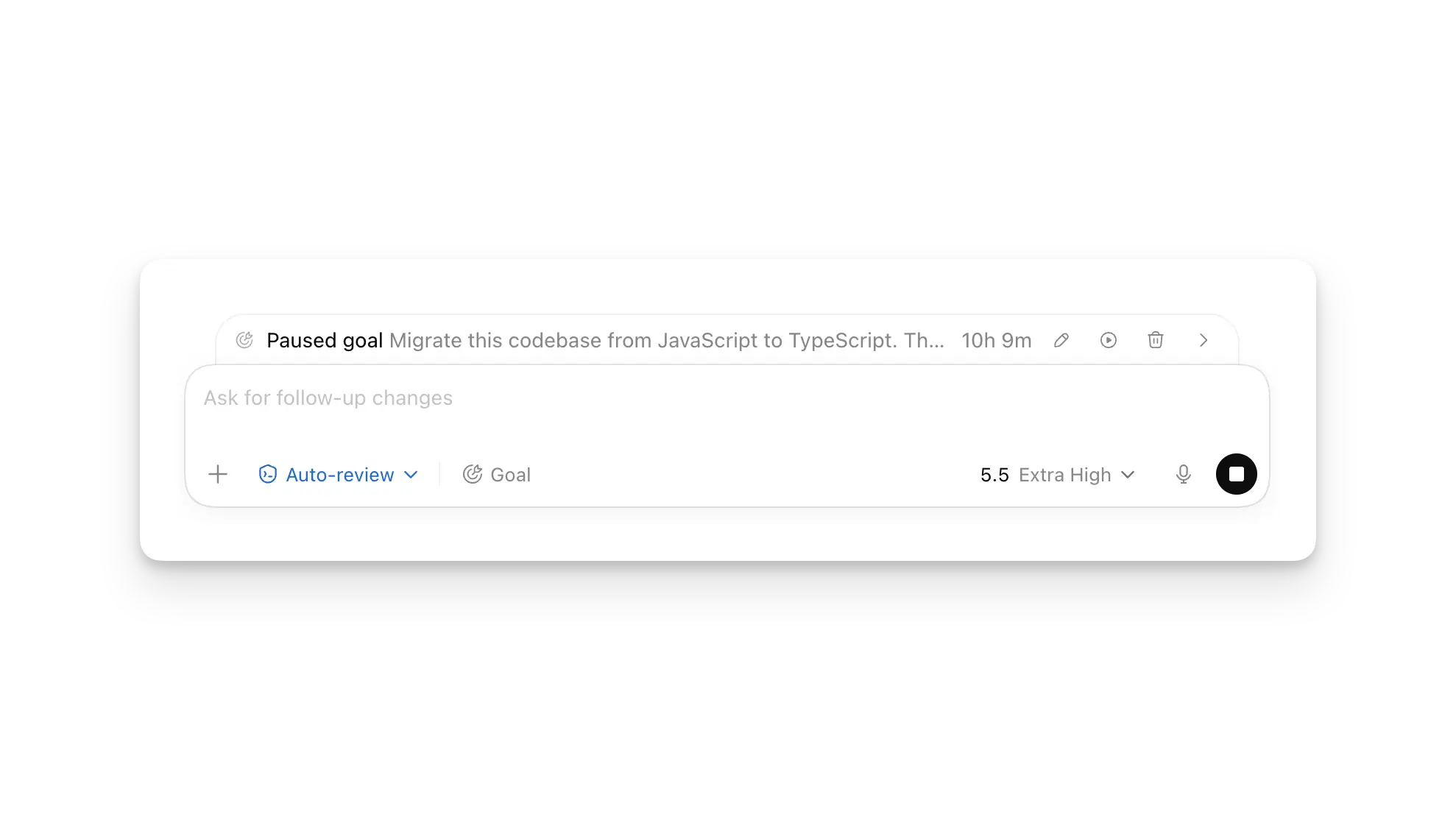
当 goal 处于 active 状态时,app 会在 composer 上方显示它的 progress。请使用 progress row 中的 buttons 来 pause 或 resume goal、edit goal text,或 clear goal,而不是再输入另一个 slash command。Goal 运行时,你仍然可以用 follow-up messages 持续引导 Codex。
关于如何编写 effective goals,请参见 Goal mode。
Deep links
Codex app 会注册 codex:// URL scheme,因此 links 可以直接打开 app 的特定部分。在把 query string values 加到 URL 之前,请先 encode。
Supported links
创建 links 时请使用这些 canonical forms。下面的 sections 会按 link type 列出完整 reference。
| Deep link | Opens |
|---|---|
| codex://threads/new | A new local thread. |
| codex://new?<query> | A new local thread with at least one new-thread query parameter. |
| codex://threads/<thread-id> | A local thread. <thread-id> must be the thread session UUID. |
| codex://settings | Settings. |
| codex://settings/connections/<connection-type> | Computer, device, or SSH connection settings. |
| codex://settings/connections/ssh/add?name=<ssh-config-host> | Adds a host from your SSH config to Codex. |
| codex://skills | Skills. |
| codex://automations | Automations with the create flow open. |
| codex://plugins/install/<plugin-name>?marketplace=<marketplace-name> | The install flow for a plugin from a known marketplace. |
| codex://plugins/<plugin-id> | A plugin detail page. |
| codex://plugins/<plugin-name>?marketplacePath=<absolute-marketplace-path> | A local plugin detail page from a local marketplace. |
| codex://pets/install?name=<pet-name>&imageUrl=<https-image-url> | The pet install flow. |
Threads
当你需要打开 existing local thread 或启动 new one 时,请使用这些 links。
| Deep link | Opens |
|---|---|
| codex://threads/<thread-id> | A local thread. <thread-id> must be the thread session UUID. |
| codex://threads/new | A new local thread. |
| codex://threads/new?<query> | A new local thread with optional query parameters. |
| codex://new?<query> | A new local thread. Include at least one of prompt, path, or originUrl; otherwise the link does nothing. |
对于 codex://threads/new 或 codex://new,请按需添加以下 query parameters;你可以在同一个 URL 中组合它们。
| Query parameter | Required | What it does |
|---|---|---|
| prompt=<text> | No | 设置 initial composer text。 |
| path=<absolute-path> | No | 在 local workspace 中打开 new thread。path 必须是指向 local directory 的 absolute path。有效时,Codex 会把该 directory 作为 active workspace。 |
| originUrl=<git-remote-url> | No | 按 Git remote URL 匹配你当前的 workspace roots 之一。如果同时存在 path,Codex 会先 resolve path。 |
Settings
当你需要打开 Settings 或特定 settings page 时,请使用这些 links。
| Deep link | Opens |
|---|---|
| codex://settings | Settings. |
| codex://settings/browser-use | Browser settings. |
| codex://settings/computer-use/google-chrome | Google Chrome settings for computer use. |
| codex://settings/connections | Remote connections settings. |
| codex://settings/connections/computer | 用于从另一个 device 控制这台 Mac 或 PC 的 settings。 |
| codex://settings/connections/devices | 用于控制其他 devices 的 settings。 |
| codex://settings/connections/ssh | SSH connection settings. |
| codex://settings/connections/ssh/add?name=<ssh-config-host> | 将 named host alias 作为 Codex-managed connection 添加,然后打开 SSH connection settings。 |
name value 必须匹配 ~/.ssh/config 中的 host alias。这个 link 会为添加的 host 禁用 automatic connection。如果 Codex 找不到 named host,它会打开 SSH connection settings 并显示 error。
Unsupported codex://settings/... paths 会打开 main Settings page。
Skills
当你需要打开 Skills 时,请使用这些 links。
| Deep link | Opens |
|---|---|
| codex://skills | Skills. |
Automations
当你需要打开 Automations 时,请使用这些 links。
| Deep link | Opens |
|---|---|
| codex://automations | Automations with the create flow open. |
Plugins
Plugin links 会根据你是从 marketplace 安装、打开 plugin,还是从 local marketplace.json 工作而使用不同 forms。Plugin basics 请参见 Plugins;local 或 repo marketplace setup 请参见 Build plugins。
Plugin install
使用这个 form 打开某个 plugin 的 install flow,前提是该 plugin 来自 Codex 已知的 marketplace。
| Deep link | Opens |
|---|---|
| codex://plugins/install/<plugin-name>?marketplace=<marketplace-name> | 某个 plugin 的 detail 或 install flow。 |
| Query parameter | Required | What it does |
|---|---|---|
| marketplace=<marketplace-name> | Yes | 标识 marketplace。对于 OpenAI-curated plugin,请使用 openai-curated。 |
install link 只接受 marketplace query parameter。如果 Codex 找不到 requested marketplace 或 plugin,它会改为打开 Plugins page。
Plugin detail
| Deep link | Opens |
|---|---|
| codex://plugins/<plugin-id> | A plugin detail page. |
<plugin-id> 必须 identify 该 plugin。对于 OpenAI-curated plugin,请使用 <plugin-name>@openai-curated 这种 form。
Codex-generated plugin links 还可以包含以下 query parameters。手动编写 link 时,请省略这两个参数。
| Query parameter | Required | What it does |
|---|---|---|
| hostId=<host-id> | No | 标识拥有 plugin context 的 Codex host,例如 local 或你配置的 remote connections 之一。Codex 会提供这些 IDs。 |
| source=manage | No | 保留 app 的 plugin-management entry point。它不是 admin-only。 |
Local plugin
关于 local 或 repo marketplace setup,请参见 Build plugins。
| Deep link | Opens |
|---|---|
| codex://plugins/<plugin-name>?marketplacePath=<absolute-marketplace-path> | A local plugin detail page from a local marketplace. |
| Query parameter | Required | What it does |
|---|---|---|
| marketplacePath=<absolute-marketplace-path> | Yes | 指向 local marketplace.json 的 absolute path,例如 /Users/alex/.agents/plugins/marketplace.json。 |
| mode=share | No | 打开该 local plugin 的 share flow。 |
Pets
当 pet install flow feature 启用时,请使用这些 links 打开它。
| Deep link | Opens |
|---|---|
| codex://pets/install?name=<pet-name>&imageUrl=<https-image-url> | The pet install flow. |
| Query parameter | Required | What it does |
|---|---|---|
| name=<pet-name> | Yes | 设置 pet name。 |
| imageUrl=<https-image-url> | Yes | 设置 pet image URL。imageUrl 必须是 HTTPS。 |
| description=<text> | No | 设置 optional pet description。 |