Codex IDE extension 让你可以直接在 VS Code、Cursor、Windsurf 以及其他兼容 VS Code 的 editor 中访问 Codex。它使用与 Codex CLI 相同的 agent,并共享同一套 configuration。
向 Codex 提示
在 editor 中使用 Codex,可以顺畅地 chat、edit 并 preview changes。当 Codex 能从打开的 files 和选中的 code 获取 context 时,你可以写更短的 prompts,并获得更快、更相关的结果。
你可以在 prompt 中像下面这样 tag 任意 editor file 作为引用:
Use @example.tsx as a reference to add a new page named "Resources" to the app that contains a list of resources defined in @resources.ts切换 models
你可以使用 chat input 下方的 switcher 切换 models。
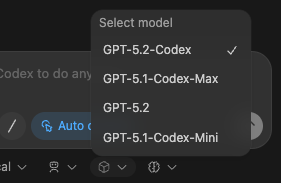
调整 reasoning effort
你可以调整 reasoning effort,以控制 Codex 在回复前思考多久。更高的 effort 可以帮助处理复杂任务,但响应会更慢。更高的 effort 也会使用更多 tokens,并可能更快消耗你的 rate limits,尤其是在使用能力更强的 models 时。
使用上面显示的同一个 model switcher,并为每个 model 选择 low、medium 或 high。建议从 medium 开始,只有在需要更深入推理时再切换到 high。
选择 approval mode
默认情况下,Codex 以 Agent mode 运行。在这个模式下,Codex 可以自动读取 files、进行 edits,并在 working directory 中运行 commands。Codex 如果要在 working directory 之外工作或访问 network,仍然需要你的 approval。
当你只想 chat,或者想先 plan 再进行 changes 时,可以通过 chat input 下方的 switcher 切换到 Chat。
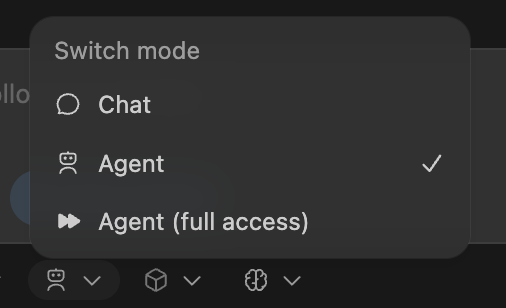
如果你需要 Codex 在不经 approval 的情况下读取 files、进行 edits,并带 network access 运行 commands,请使用 Agent (Full Access)。启用前请谨慎评估。
Cloud delegation
你可以把更大的 jobs 交给 cloud 中的 Codex 处理,然后不离开 IDE 就能 track progress 并 review results。
为 Codex 设置 cloud environment。
选择你的 environment,然后选择 Run in the cloud。
你可以让 Codex 从 main 运行(适合开始新想法),也可以从你的 local changes 运行(适合完成当前 task)。
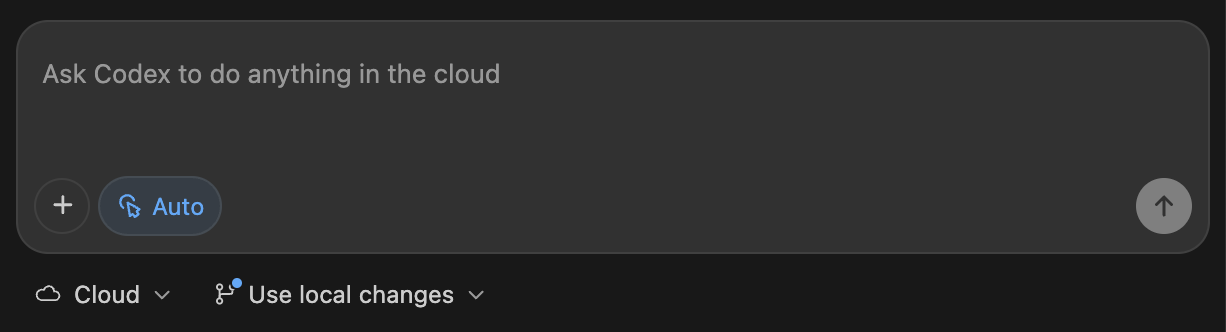
当你从 local conversation 启动 cloud task 时,Codex 会记住 conversation context,因此它可以从你离开的地方继续。
Cloud task follow-up
Codex extension 让 preview cloud changes 变得直接。你可以要求后续 follow-ups 在 cloud 中运行,但通常也会希望把 changes 应用到本地,以便 test 并完成收尾。当你在本地继续 conversation 时,Codex 也会保留 context,节省你的时间。
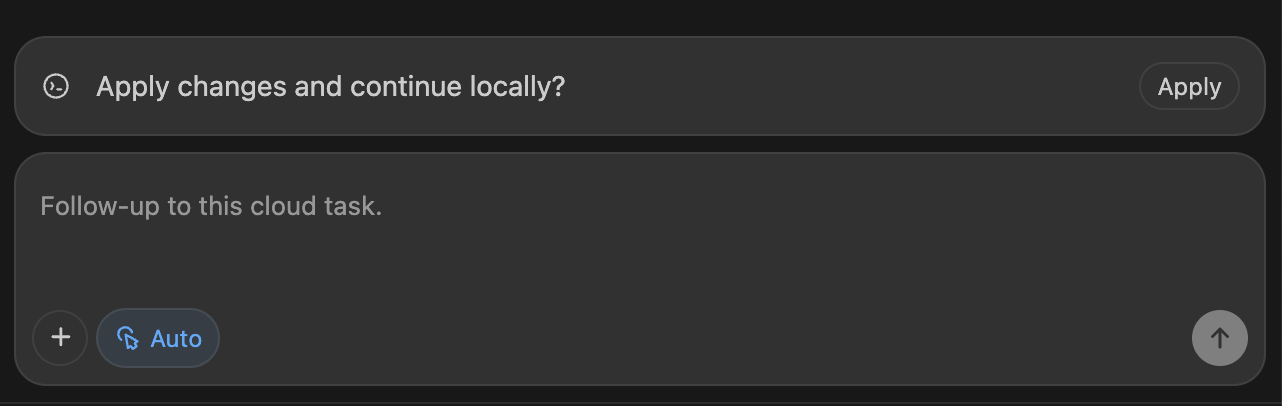
你也可以在 Codex cloud interface 中查看这些 cloud tasks。
Web search
Codex 随附 first-party web search tool。对于 Codex IDE Extension 中的 local tasks,Codex 默认启用 web search,并从 web search cache 提供结果。该 cache 是 OpenAI 维护的 web results index,因此 cached mode 会返回预索引结果,而不是抓取 live pages。这会减少 arbitrary live content 带来的 prompt injection 暴露,但你仍应把 web results 视为 untrusted。如果你把 sandbox 配置为 full access,web search 默认使用 live results。若要禁用 web search,或切换到会获取最新数据的 live results,请参见 Config basics。
每当 Codex 查找内容时,你会在 transcript 或 codex exec --json output 中看到 web_search items。
把 images 拖放到 prompt 中
你可以把 images 拖放到 prompt composer 中,将它们作为 context。
拖放 image 时按住 Shift。否则 VS Code 会阻止 extensions 接受 drop。
Image generation
你可以要求 Codex 在不离开 editor 的情况下 generate 或 edit images。这适用于 UI assets、layouts、illustrations、sprite sheets,以及工作中的 quick placeholders。当你希望 Codex transform 或 extend 现有 asset 时,请在 prompt 中添加 reference image。
你可以用 natural language 提出请求,也可以在 prompt 中加入 $imagegen 来显式调用 image generation skill。
内置 image generation 使用 gpt-image-2,会计入你的 general Codex usage limits;平均来看,取决于 image quality 和 size,它消耗 included limits 的速度是类似但不含 image generation 的 turns 的 3-5x。详情请参见 Pricing。prompting tips 和 model details 请参见 image generation guide。
对于较大批量的 image generation,请在 environment variables 中设置 OPENAI_API_KEY,并要求 Codex 通过 API generate images,这样会改用 API pricing。